
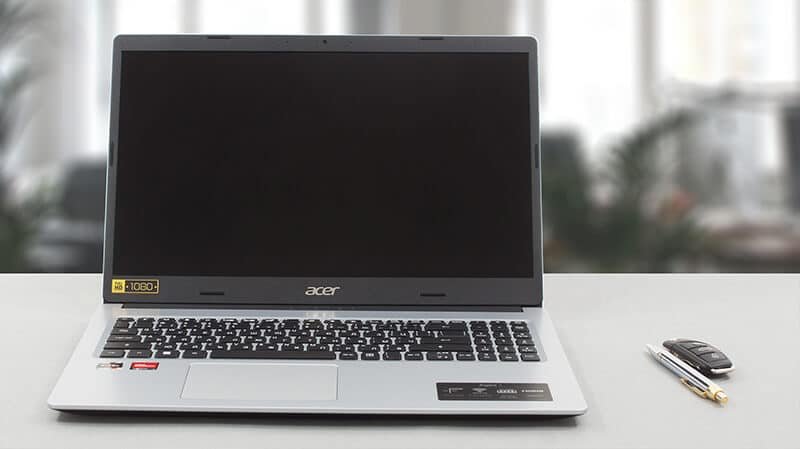
Acer Aspire 3 is designed for buyers who want a practical Windows laptop without paying for premium hardware they may not need. The family covers several generations and configurations, so performance can vary significantly between models. Recent versions include Intel and AMD processors, Full HD displays, SSD storage, and memory options aimed at everyday computing.
For students, home users, office workers, and anyone who mainly browses, writes documents, streams video, and uses common productivity apps, this laptop can be a sensible choice when the configuration and price are right. The key is to shop by the exact model number rather than the family name alone.
What Is This Laptop Family?
This is an entry-level to mid-range Windows laptop family from Acer. It focuses on practical features rather than premium materials or high-end gaming hardware. Depending on the model, you can find 15.6-inch Full HD screens, Intel Core processors, AMD Ryzen chips, integrated graphics, NVMe SSDs, and Windows 11.
Acer’s official specifications show how wide the range is. One configuration with a Ryzen 3 7320U has 16 GB of LPDDR5 memory and a 15.6-inch Full HD IPS display, while a Ryzen 5 7520U version combines 16 GB memory with a 1 TB NVMe SSD and a touchscreen. Intel versions have included chips such as the Core i5-1235U and Core i7-1255U, with some models supporting up to 32 GB of memory.
Acer Aspire 3 Specs: What Should You Expect?
There is no single specification sheet for the entire range. Treat the following as a practical guide to configurations you may encounter.
| Feature | Common configurations | What it means |
|---|---|---|
| Display | 15.6-inch Full HD; some older HD panels | Full HD is preferable for sharper text |
| Processor | Intel Core, Intel N-series, AMD Ryzen | Choose according to workload |
| Memory | 4 GB to 16 GB; some models support more | 8 GB is a sensible minimum |
| Storage | 128 GB to 1 TB SSD | 256 GB or more is more comfortable |
| Graphics | Intel or AMD integrated graphics | Best for everyday graphics, not demanding gaming |
| Operating system | Windows 11 Home on many models | Ready for standard Windows software |
A UK configuration with a Core i5-1235U, for example, has 8 GB DDR4 memory and a 256 GB PCIe NVMe SSD, while a Core i7-1255U model is available with 16 GB memory. Acer also lists AMD models using Ryzen 5 processors.
Display and Build
A 15.6-inch Full HD panel is a good choice for office work and study because it provides more usable screen space than a basic 1366 × 768 display. Some versions use IPS technology, while others use TN panels, so viewing angles and screen quality depend on the exact SKU.
The chassis is generally functional rather than luxurious. That suits buyers who care more about price and everyday usability than a metal body, premium speakers, or a high-end display.
How Does It Perform for Everyday Work?
For browsing with several tabs, Microsoft Office, email, online classes, video calls, document editing, and media streaming, a well-equipped Acer Aspire 3 is capable of handling routine workloads.
The processor becomes more important when multitasking. A modern Ryzen 5 or Core i5 model is a better choice for heavier everyday use than an entry-level Celeron or Pentium configuration. An SSD also improves startup, application loading, and file access compared with older mechanical storage.
For students, 8 GB of RAM can handle ordinary coursework, while 16 GB is a better long-term choice if the budget allows. Some models use onboard memory, making the original configuration particularly important.
Is the Acer Aspire 3 Good for Gaming?
It is not primarily a gaming laptop. Most versions rely on integrated Intel or AMD graphics rather than a dedicated GPU. That makes them suitable for lighter games and older titles at sensible settings, but demanding modern games are outside the product’s main purpose.
💡 Pro Tip
Do not choose an Aspire 3 by processor name alone. Check the exact model number, RAM capacity, display panel, SSD size, and graphics hardware together. A balanced Core i5 or Ryzen 5 configuration with 16 GB memory and a Full HD IPS screen can be more useful than a model with a stronger headline specification but weaker supporting hardware.
Battery Life, Ports, and Connectivity
Battery results vary by processor, screen, battery capacity, software, and workload. Acer publishes different estimates across configurations, so advertised battery figures should be treated as model-specific rather than universal.
Connectivity is generally practical. Depending on the model, you may find USB Type-A, USB Type-C, HDMI, Wi-Fi, Bluetooth, and sometimes Ethernet. One Ryzen 5 7520U configuration, for example, lists two USB 3.2 Type-A ports, one USB Type-C port, HDMI, Wi-Fi, and Bluetooth.
Before buying, check whether the exact model includes the ports you need. Users who regularly connect external displays, wired networks, or older USB accessories should pay particular attention to the port layout.
Who Should Buy the Acer Aspire 3?
The range is a good fit for buyers who value straightforward functionality over premium design. It can work well for:
- Students who need a Windows laptop for coursework and research
- Home users handling browsing, streaming, documents, and email
- Office users with moderate productivity workloads
- Families looking for a general-purpose computer
- Buyers who prefer SSD storage and Full HD resolution
It is less suitable for people who need high-end gaming performance, professional color-critical displays, workstation-class processing, or a premium thin-and-light design.
📌 Key Takeaway
The best Acer Aspire 3 is not necessarily the most expensive version. Prioritize a recent processor, 8 GB or preferably 16 GB of RAM, a Full HD display, and at least a 256 GB SSD. Then compare the exact model’s screen technology, ports, upgrade options, and battery specification before purchasing.
Frequently Asked Questions
Is Acer Aspire 3 good for students?
Yes. A configuration with a modern Core i3/Core i5 or Ryzen processor, 8 GB or 16 GB RAM, and an SSD is well suited to browsing, assignments, research, video calls, and everyday study software. A Full HD display is preferable if the laptop will be used for several hours each day.
Can the Acer Aspire 3 run Windows 11?
Many recent configurations ship with Windows 11 Home. Compatibility can differ with older hardware, so buyers should verify the operating system and exact model specifications before purchasing a used or older unit.
Does Acer Aspire 3 have an SSD?
Many models do. Official specifications list PCIe NVMe SSDs in capacities including 128 GB, 256 GB, 512 GB, and 1 TB, depending on the configuration. Always confirm the storage type and capacity on the specific product listing rather than assuming every unit uses the same drive.
Is Acer Aspire 3 suitable for office work?
Yes, especially with 8 GB or 16 GB of memory and an SSD. Word processing, spreadsheets, email, presentations, browser-based work, and video meetings are within the range’s intended everyday use. Heavy workstation workloads are better served by a more powerful professional laptop.
Can Acer Aspire 3 handle gaming?
It can handle lighter gaming on configurations with integrated Intel or AMD graphics, but it is not designed as a dedicated gaming machine. For demanding modern titles, look for a laptop with a discrete GPU, stronger cooling, and a gaming-focused display.
The Acer Aspire 3 remains a sensible option when the goal is dependable everyday computing at a lower price. Its biggest strength is the breadth of configurations, but that is also why buyers need to compare specifications carefully. Choose the model with the right processor, memory, SSD, and Full HD display for your workload rather than buying solely because it carries the Aspire 3 name.

2 Comments
Pingback: Dyson V15: Is This Cordless Vacuum Still Worth Buying?
Pingback: Acer Aspire 5: Is It Still Worth Buying?