
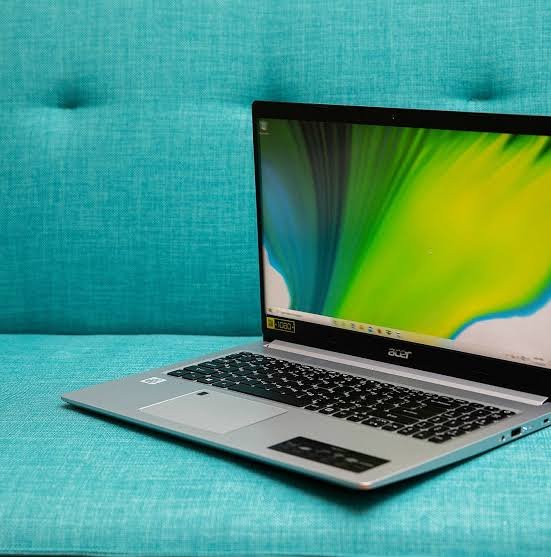
The Acer Aspire 5 remains one of Acer’s best-known mainstream laptops because it focuses on practical hardware rather than premium extras. Depending on the exact model, buyers can find 13th-generation Intel Core processors, 15.6-inch Full HD IPS displays, SSD storage, backlit keyboards, and a useful selection of ports. That makes the Acer Aspire 5 a sensible candidate for students, office workers, home users, and anyone who wants a capable Windows laptop without paying for a high-end design.
The catch is that “Aspire 5” covers several configurations. A Core i5 model with 16GB memory is a very different proposition from an entry-level Core i3 configuration or an Aspire 5 fitted with a dedicated GeForce RTX 2050 GPU. The right choice depends on what you plan to do with it.
Acer Aspire 5 specifications that matter
A representative A515-58M configuration sold by Acer in the US combines Windows 11 Home, an Intel Core i5-1335U processor, 16GB LPDDR5 memory, a 512GB SSD, and a 15.6-inch Full HD IPS display running at 60Hz. Acer also lists a Core i7-1355U version with the same 16GB/512GB combination. Battery life is rated at up to nine hours for that configuration, although real-world endurance depends on workload and settings.
Acer’s specification sheet for the A515-58M family shows that configurations can also use Core i3 processors and different storage and memory arrangements. Some versions support up to 32GB DDR4 memory, while LPDDR5 configurations are available with 8GB, 16GB, or 32GB onboard memory. Storage options include 256GB, 512GB, and 1TB PCIe NVMe SSDs.
| Specification | Typical Aspire 5 A515-58 configuration |
|---|---|
| Processor | Intel Core i5-1335U or Core i7-1355U |
| Display | 15.6-inch Full HD IPS, 60Hz |
| Memory | 16GB LPDDR5 on listed US models |
| Storage | 512GB SSD on listed US models |
| Graphics | Intel Iris Xe; some variants use RTX 2050 |
| Operating system | Windows 11 Home |
| Weight | Around 3.9 lb on 15.6-inch models |
| Ports | USB, USB-C, HDMI, and headphone jack |
Because Acer sells multiple regional and model-number variants, always check the exact part number before ordering.
Performance for work and study
For everyday productivity, the Acer Aspire 5 is comfortably positioned above basic entry-level notebooks when equipped with a modern Core i5 or Core i7 processor and adequate memory. Web browsing, Microsoft Office, video calls, research, streaming, and large collections of browser tabs are realistic workloads for these configurations.
The Core i5-1335U has 10 cores and can reach up to 4.6GHz, while the i7-1355U has 10 cores and can reach up to 5GHz. These are efficient laptop processors aimed at mainstream mobile computing rather than heavy workstation workloads.
That distinction matters. The Acer Aspire 5 can handle development work, light photo editing, and general creative applications, but professionals working with demanding 3D rendering, large video projects, or sustained CPU-intensive workloads should consider a more powerful machine with stronger cooling and dedicated graphics.
Display and design
The 15.6-inch Full HD IPS panel is practical for productivity. The larger screen gives spreadsheets, documents, browser windows, and school assignments more room than a compact 13- or 14-inch laptop. Acer’s US configurations also include a backlit keyboard, which is useful when working in dim environments.
The display is less impressive for color-critical creative work. The A515-58M specification sheet lists a 45% NTSC color gamut for its standard Full HD panel. That is adequate for office use and entertainment, but photographers, designers, and video editors who need accurate, wide-gamut color should look at a higher-end display.
Build quality is similarly functional rather than luxurious. Independent testing of the A515-58M describes it as a practical productivity laptop, with a comfortable keyboard and broad connectivity, while noting that more premium machines can offer better materials and screens.
💡 Pro Tip
If you are buying an Acer Aspire 5 for several years of university or office work, prioritize 16GB of RAM and at least a 512GB SSD. Those specifications usually have a bigger everyday impact than choosing the fastest processor available in the range.
Ports and connectivity
Connectivity is one of the stronger aspects of the Aspire 5 family. A listed US A515-58M model includes two USB 3.2 Gen 1 ports, one USB Type-C port with Thunderbolt 4, HDMI, and a headphone jack. Wi-Fi 6 and Bluetooth are also supported on the configuration.
That port selection makes the laptop easier to use with external displays, USB accessories, storage drives, and wired audio without immediately reaching for a hub. For students and office users who move between a desk and different workspaces, this practical flexibility can be more valuable than a very thin chassis.
Can it handle gaming?
The answer depends heavily on the graphics configuration. Standard versions rely on Intel integrated graphics, which are suitable for lighter games and casual titles at modest settings. They are not intended to compete with dedicated gaming laptops.
Acer also produced Aspire 5 variants with an NVIDIA GeForce RTX 2050. That provides considerably more graphics capability than integrated Iris Xe, but it does not turn the machine into a full gaming laptop. Notebookcheck’s testing of an A515-58GM found strong general system performance but also highlighted compromises in the screen, speakers, and sustained-load behavior.
For occasional gaming, the dedicated-GPU version can make sense. For someone buying primarily for gaming, a purpose-built gaming laptop is usually a better direction.
Upgradeability and long-term value
Upgrade options vary by exact Aspire 5 model. Acer’s family specification sheet lists both onboard LPDDR5 configurations and models supporting DDR4 SO-DIMM memory, so buyers should not assume that every Aspire 5 has the same upgrade path.
Storage is another area where checking the exact model pays off. PCIe NVMe SSDs are used across the family, and some configurations offer capacities up to 1TB. If you expect to store large media libraries, games, or project files, 512GB is a comfortable starting point, while 1TB provides considerably more breathing room.
The Acer Aspire 5 is therefore best judged by its configuration rather than its name alone. A well-equipped model can remain useful for years, while a low-memory entry-level version may feel restrictive much sooner.
Who should buy it?
The Acer Aspire 5 makes the most sense for people who want a straightforward Windows laptop for everyday work. Students can use it for coursework, research, presentations, and online classes. Office users get a large Full HD screen, familiar Windows software, and useful connectivity. Home users can comfortably handle browsing, streaming, email, and general productivity.
It is less suitable for buyers who prioritize a premium display, ultra-light construction, high-end gaming, or professional creative performance. In those cases, spending more on a specialized laptop may provide a noticeably better experience.
📌 Key Takeaway
The Acer Aspire 5 is a practical all-rounder, but the exact model matters more than the family name. A 16GB Core i5 configuration with a 512GB SSD offers a strong balance for everyday productivity, while dedicated-GPU versions are better suited to light gaming and graphics workloads. Check the processor, RAM, storage, display, and model number before buying.
Frequently Asked Questions
Is the Acer Aspire 5 good for students?
Yes. A configuration with a modern Core i5 processor, 16GB RAM, and a 512GB SSD is well suited to research, documents, presentations, video calls, and multitasking. The 15.6-inch display also gives students plenty of workspace. For basic coursework, a less expensive configuration can work, but 16GB provides more flexibility.
Is the Acer Aspire 5 good for programming?
It can be a good programming laptop for web development, software projects, databases, and development tools. A Core i5 or better processor with 16GB RAM is preferable if you regularly run an IDE, browser tabs, local servers, containers, or virtual machines at the same time.
Can you upgrade the RAM?
It depends on the model. Some Aspire 5 variants use onboard LPDDR5 memory, while other versions support DDR4 SO-DIMM modules. Check the exact model number and Acer’s specifications before assuming an upgrade is possible.
Does it have good battery life?
Acer rates a listed A515-58M configuration for up to nine hours. Actual battery life can be lower because screen brightness, applications, wireless activity, processor load, and power settings all affect endurance. Treat the advertised figure as a best-case rating rather than a guaranteed daily result.
Is it worth buying for gaming?
Only if your gaming expectations are modest or you choose a dedicated-GPU version. Integrated graphics are aimed at lighter gaming, while the RTX 2050 configuration offers more performance. For frequent modern AAA gaming, a dedicated gaming laptop with a stronger GPU, display, and cooling system is a better fit.
The Acer Aspire 5 continues to make sense because it does not try to be everything at once. Its stronger configurations deliver the hardware most people actually need for work, study, browsing, and entertainment, while the wide range of variants gives buyers room to choose. The safest purchase is a configuration with enough RAM, a fast SSD, and a processor matched to your workload rather than simply choosing the most expensive version.
